Start with the App Store release
- Best default path for most users
- Current public pricing and purchase flow
- Free tier stays preview-first before paid apply actions
On the Mac App Store. macOS 15+. One-time purchase, no subscription.
A disk space analyzer for macOS, not an automatic cleaner.
Scan locally, see exact paths and sizes, and decide what to remove yourself. Nothing is deleted without your say.
Treemap, large files, Duplicate Review, leftovers, and storage hotspots stay visible before any cleanup step.
Nothing is deleted without your approval. Dry Run shows the exact paths and sizes before anything applies.
Snapshots, reports, and cleanup history stay on your Mac. No cloud sync. No account required.
The App Store version is the standard path for most users. Need broader filesystem access for advanced analysis workflows? See the Direct build
Free to scan and review. Cleanups move to Trash by default. One-time purchase to apply.
StorageRadar is built around deliberate action: analysis and cleanup are always separate steps.
Choose a scan source: Home folder, Developer folder, System Volume, or a custom directory. The scanner indexes your files and shows live metrics as it goes.
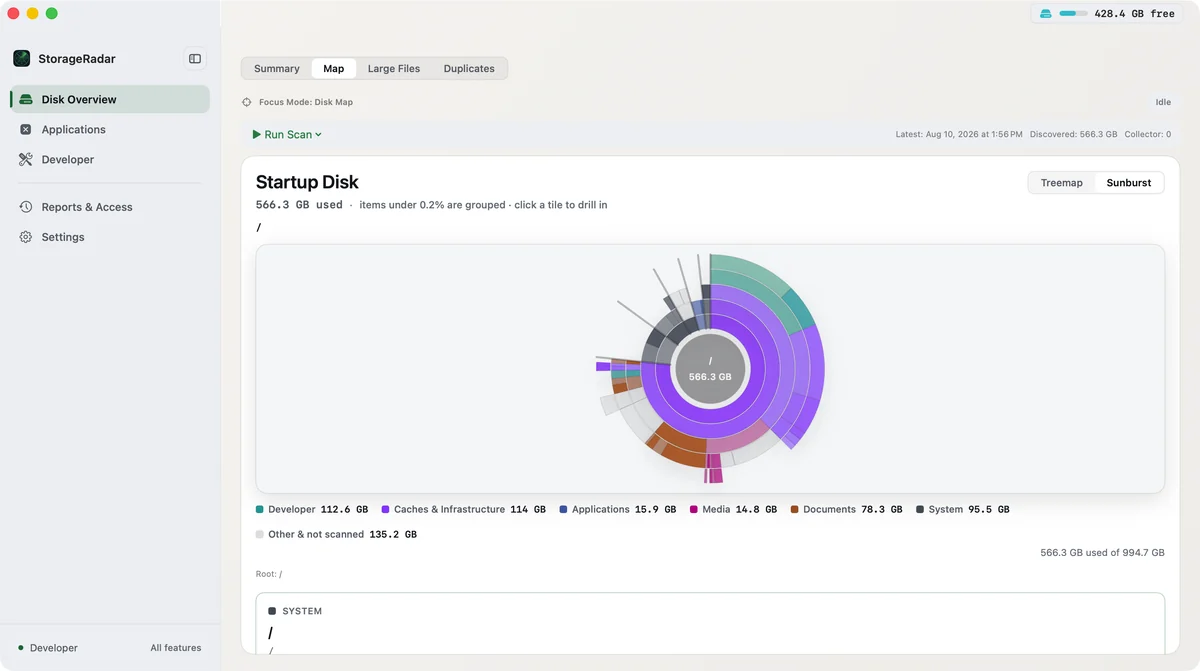
Navigate your disk through Treemap or Sunburst. Browse largest files. Find apps with leftover bloat. See exactly what's using your space before you do anything.
Dry-run first and see what would be removed. For risky operations, step through a pre-apply review that shows exactly what changes. Then apply: move to Trash with undo support or delete permanently.
StorageRadar is built for evidence first: visualize what is using space, resolve permissions blockers, compare snapshots over time, then act locally with full review.
Summary shows free space, storage by category, and what you can reclaim. In Map, Treemap and Sunburst views turn disk usage into evidence you can inspect, and Large Files lists the biggest files in the scan. Shortlist candidates, review exact paths, and build a cleanup batch in the Cleanup List before any destructive action. In Duplicates, use Duplicate Review to group exact file copies, compare potential savings, preview selections, and move verified duplicates to Trash only after review.
Developer environments mix rebuildable caches with workflow-sensitive data. StorageRadar separates the two, adds ecosystem context, and lets you inspect profiles, dry-run risky actions, and step through a safety review before apply is unlocked.
Capture snapshots locally, then compare what grew, shrank, appeared, or disappeared when storage management needs evidence over time, not just a one-time panic cleanup.
When macOS blocks access, StorageRadar tells you exactly which path is affected and what permission is missing. The blocker stays visible instead of disappearing into a black box.
Apps leave support files across caches, containers, preferences, and logs. StorageRadar shows the residue path by path so you can inspect the uninstall plan, re-check access, and preview the result before apply.
Optional local integration. Run a read-only endpoint on 127.0.0.1 that AI agents can query for disk analytics. No file access, no deletion capability: just aggregated insights over a secure local connection.
Your files never leave your Mac. Scan sessions, snapshots, reports, and cleanup history all live in ~/Library/Application Support/StorageRadar/ on this machine. The only outbound signals are feature-level analytics (which workflows ran, not what was inside) and crash reports. Both are on by default, and you can turn either one off in Settings. Neither carries file paths or scan contents.
Scan sessions, indexes, snapshots, reports, cleanup history, and local usage metrics live on this Mac.
There is no StorageRadar account and no remote workspace for your scans, reports, or cleanup history.
Usage analytics receive feature-level events: which workflows ran, not what was inside them. No file paths, names, scan contents, or MCP tokens ever leave the app.
Crash diagnostics use Sentry. Scan contents are never attached. You can turn delivery off in Settings at any time.
The AI integration runs on 127.0.0.1 and stays read-only: no delete, move, or file-content access.
One-time purchase. No subscription. Family Sharing supported where available. Free keeps preview access across Disk Overview, Duplicate Review, App Uninstaller, Dev Cleanup, and Reports. Core is $9.99, Developer is $19.99, and upgrading from Core to Developer is $9.99.
Preview every main workflow before deciding which cleanup and reporting actions are worth unlocking.
For people who want to act on file cleanup and app removal after reviewing the evidence.
For developers who need ecosystem-aware cleanup and full compare/export reports over time.
Free keeps preview access across all main workspaces · Upgrade from Core to Developer is $9.99 · USD pricing shown; regional App Store pricing may vary · No subscription · Family Sharing supported where available
Yes. The Free tier keeps preview mode across Disk Overview, App Uninstaller, Dev Cleanup, and Reports. You can inspect results, run Dry Run, Preview Removal, or Guided Preflight where applicable, and capture local snapshots before you unlock paid apply actions or Reports comparison and export.
Yes. Buy the Direct build on this site and your license key arrives by email. No Apple ID, no account here, and a 14-day refund. The Direct build runs outside App Store sandboxing, so it reaches developer caches the sandboxed version cannot. If you already bought on the App Store, open Settings > Purchases > Get Direct License Key and activate that key in the Direct build at no extra cost.
Yes. StorageRadar supports Apple's Family Sharing for eligible one-time App Store purchases. Availability still depends on the Apple family group, purchase sharing settings, and App Store account state.
Yes for core workflows. Scanning, analysis, visualization, dry-run, permissions diagnostics, snapshots, reports, and local MCP access work on-device. Network is only needed for App Store purchases or restore flows and, if you keep them enabled, privacy-safe product analytics or Sentry diagnostics and feedback.
Core storage data stays local: scan indexes, cleanup history, snapshots, reports, and local usage metrics stay on-device. StorageRadar also has separate remote channels for privacy-safe product analytics (Aptabase) and diagnostics or feedback (Sentry). Remote delivery does not include scan paths, file names, bundle identifiers, snapshot labels, raw scan payloads, MCP secrets, or raw error text, and scan files are not attached automatically. Both can be turned off in Settings.
StorageRadar is not a one-click cleaner. It's built around a deliberate workflow: scan → visualize → review → act. Nothing is deleted automatically. Every cleanup requires your explicit decision, and risky operations require dry-run or guided preflight first. You're always in control.
Yes. Duplicate Review finds exact duplicate files, groups them for comparison, shows potential savings, and lets you preview selections before moving anything to Trash. It is review-first, not automatic cleanup.
Dry Run simulates a cleanup operation without deleting or moving anything. You see exactly what would be affected (paths, sizes, risk levels) before committing. For risky developer profiles, there's also a Guided Preflight that walks you through potential consequences step by step before unlock.
Move to Trash supports a quick undo window: you can restore items from Trash via Finder afterward. Delete Permanently does not support undo. StorageRadar always makes the distinction clear and asks for confirmation before any permanent deletion.
Dev Cleanup covers six groups: Apple (Xcode DerivedData, Archives, simulators, device support, SwiftPM, CocoaPods, Carthage), Web (npm, pnpm, Yarn, Corepack, and node-gyp caches), Backend (Homebrew, JetBrains, Composer, Go, and Rust Cargo caches), Android (Gradle caches, the Android SDK cache, emulator artifacts), Data (pip and pytest caches), and Containers (Docker, Colima, Podman). Each profile carries its own risk level and states what happens after cleanup.
It runs a local read-only HTTP endpoint that AI assistants (like Claude via MCP) can query for disk analytics and scan data. It doesn't give AI agents any ability to delete files; it's purely informational, letting your AI tools understand your storage situation without direct filesystem access.
macOS protects certain directories (Desktop, Documents, app containers, and system volumes) from direct access. The Access screen under Reports & Access shows exactly which paths are blocked and gives you step-by-step guidance to grant appropriate access: folder-scoped permission, Full Disk Access, or App Management.
Large Files shows the biggest files and folders in your current scan. Reports starts with local snapshots, so you can keep history over time. Free and Core can capture snapshots and review that history; Developer unlocks diff and export to answer 'what grew, shrank, appeared, or disappeared?'
The App Store release is the standard path for most users. You can also buy StorageRadar on this site: the Direct build runs outside App Store sandboxing, so it reaches the developer caches a sandboxed app cannot.
On the Mac App Store. macOS 15+. One-time purchase, no subscription.
Prefer to buy outside the App Store? Buy the Direct build
Get a short email when a new version ships. No spam — and this never gates your download.
We'll let you know when the next StorageRadar build is out.
Start with the broadest diagnosis guide if the problem is still vague. Switch to the narrower article once you know the culprit is System Data, app leftovers, Xcode, Docker, or recurring growth over time.
Need to free up disk space on Mac without deleting the wrong files? Start with safe first wins, review risky paths separately, and reclaim storage without breaking apps or workflows.
Need to find what is taking space on your Mac? Learn how to find large files, review the storage tree, and identify folders using the most disk space.
Why is System Data so large on Mac? Learn which caches, snapshots, and developer artifacts inflate it, and what to check before deleting anything.
Recent release history. Each build ships what is actually stable.