My QA simulator took 9.8 GB, and my app was not the reason. Its app containers took 0.34 GB. iOS filled the rest: a cache of Lock Screen poster snapshots, the system log, downloaded Siri and language assets, and a symbol cache. I measured ten simulators on my Mac, and the app share stayed small on every one.
Main rule: measure a simulator before you erase it, then erase or delete it with xcrun simctl. Don't delete folders inside its data folder by hand.
Quick answer
- Find the heavy simulators:
du -sh ~/Library/Developer/CoreSimulator/Devices/* | sort -h | tail. - Match each UDID to a name with
xcrun simctl list devices. - Look inside one:
du -h -d 4 ~/Library/Developer/CoreSimulator/Devices/<UDID>/data | sort -h | tail -20. - If you no longer need its state, shut it down and wipe it:
xcrun simctl shutdown <UDID>, thenxcrun simctl erase <UDID>. - Remove simulators you never use with
xcrun simctl delete <UDID>.
Where 9.8 GB went in one simulator
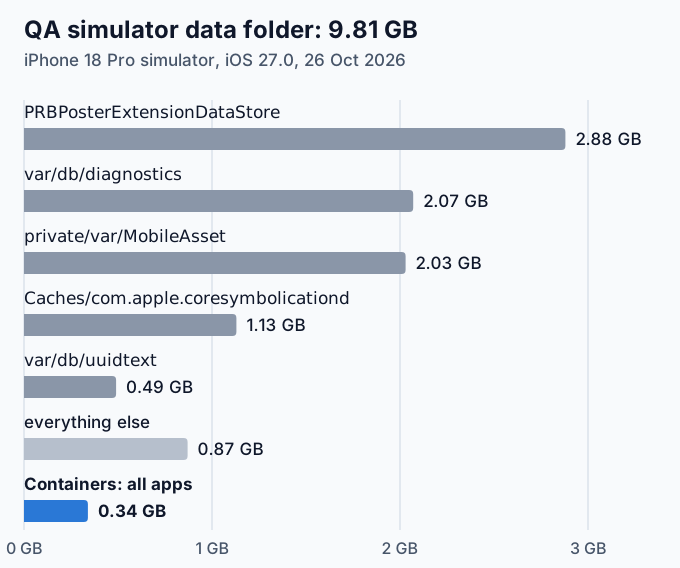
In my first measurement, one QA simulator held half of the Devices folder. A reader asked what was inside it, so I opened its data folder. The device is an iPhone 18 Pro simulator on iOS 27.0, and it was booted during the measurement.
Folder inside data | Size |
|---|---|
Library/Application Support/PRBPosterExtensionDataStore | 2.88 GB |
var/db/diagnostics | 2.07 GB |
private/var/MobileAsset | 2.03 GB |
Library/Caches/com.apple.coresymbolicationd | 1.13 GB |
var/db/uuidtext | 0.49 GB |
Containers, all app containers | 0.34 GB |
Whole data folder | 9.81 GB |
Containers holds the installed apps, their data containers, app groups and extension data. Everything my app and its tests wrote fits in that 0.34 GB.
Ten simulators side by side
My Mac has 53 simulators. Forty-three of them hold about 20 MB each, the size of a device that never ran an app. The other ten are the ones I use. Sizes are in GB.
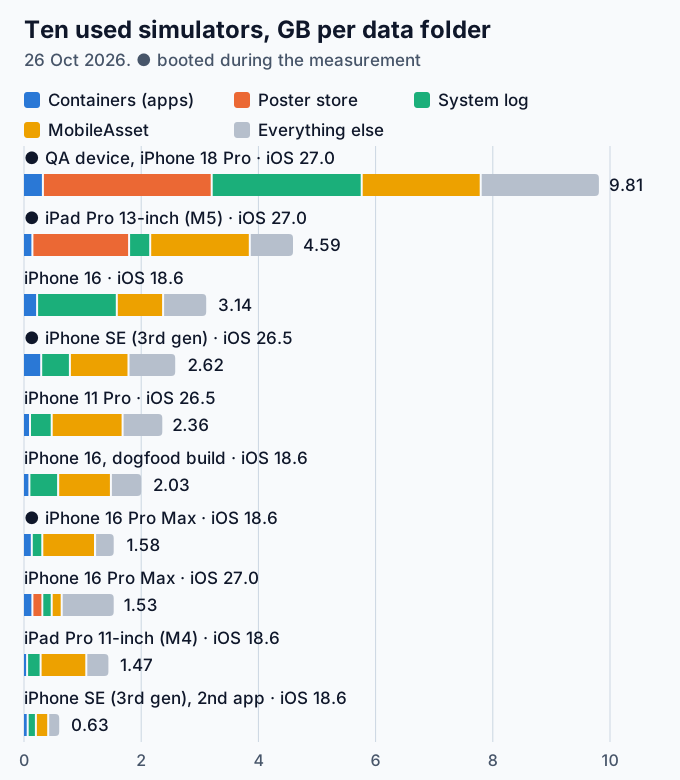
diagnostics plus uuidtext), MobileAsset and everything else. A dot marks the devices that were booted.| Simulator | iOS | State | data | Poster store | diagnostics | MobileAsset | Containers |
|---|---|---|---|---|---|---|---|
| QA device, iPhone 18 Pro | 27.0 | Booted | 9.81 | 2.88 | 2.07 | 2.03 | 0.34 |
| iPad Pro 13-inch (M5) | 27.0 | Booted | 4.59 | 1.65 | 0.21 | 1.70 | 0.16 |
| iPhone 16 | 18.6 | Shutdown | 3.14 | 0.03 | 1.22 | 0.79 | 0.24 |
| iPhone SE (3rd generation) | 26.5 | Booted | 2.62 | 0.04 | 0.36 | 1.00 | 0.31 |
| iPhone 11 Pro | 26.5 | Shutdown | 2.36 | 0.00 | 0.15 | 1.21 | 0.12 |
| iPhone 16, dogfood build | 18.6 | Shutdown | 2.03 | 0.03 | 0.36 | 0.90 | 0.11 |
| iPhone 16 Pro Max | 18.6 | Booted | 1.58 | 0.05 | 0.05 | 0.90 | 0.15 |
| iPhone 16 Pro Max | 27.0 | Shutdown | 1.53 | 0.17 | 0.02 | 0.17 | 0.16 |
| iPad Pro 11-inch (M4) | 18.6 | Shutdown | 1.47 | 0.03 | 0.09 | 0.78 | 0.07 |
| iPhone SE (3rd generation), second app | 18.6 | Shutdown | 0.63 | 0.03 | 0.01 | 0.21 | 0.08 |
Three patterns stand out:
- Containers never passed 0.34 GB. The apps I test are a rounding error next to the system data.
- MobileAsset appears on every simulator. It ranged from 0.17 to 2.03 GB.
- The poster store grew large only on the two booted iOS 27.0 devices. On iOS 18.6 and 26.5 it stayed under 0.05 GB. Two devices are not enough to blame iOS 27.0, but the gap is wide.
What each folder holds
PRBPosterExtensionDataStore: Lock Screen poster snapshots
The folder name, along with GalleryCache and SnapshotCache.cachedb, is a string in the private PosterBoard.framework of the iOS 27.0 simulator runtime. The runtime also ships a system app, PosterBoard.app, with the identifier com.apple.PosterBoard. Inside the folder, subfolders carry the IDs of Apple’s poster extensions: WeatherPoster, EmojiPoster, PhotosPosterProvider, KaleidoscopePoster and more. Apple’s guide to creating a custom Lock Screen lists Weather, Astronomy and photos among the Lock Screen wallpapers.
On my QA device the folder held 6,776 files. 2,911 of them were .atx snapshot files of about 1 MB each, named Composite.atx, Background.atx, Foreground.atx and Floating.atx, and they added up to 2.9 GB. On the iPad, all 939 snapshot files had a modification date of the measurement day, so the device writes this cache while it runs. I don’t know what makes it grow, and Apple doesn’t document it.
var/db/diagnostics and var/db/uuidtext: the system log
These folders hold the data of the unified logging system. man log describes a log store as a system logging database like the one in /var/db/diagnostics, with a uuidtext directory like /var/db/uuidtext next to it. Each simulator keeps its own copy inside its data folder. On my devices it ranged from 0.01 to 2.07 GB, plus 0.49 GB of uuidtext on the QA device.
private/var/MobileAsset: assets iOS downloads
On the QA device, AssetsV2 held asset sets named after Siri and language features:
| Asset set | Size |
|---|---|
com_apple_MobileAsset_UAF_Siri_Understanding | 805 MB |
com_apple_MobileAsset_UAF_LinguisticData | 409 MB |
com_apple_MobileAsset_UAF_Siri_TextToSpeech | 289 MB |
com_apple_MobileAsset_UAF_SearchQueryUnderstanding | 106 MB |
com_apple_MobileAsset_TTSAXResourceModelAssets | 96 MB |
The simulator downloads these itself. A developer on the Apple Developer Forums reported the same folder growing by tens of gigabytes on iOS 26.5, downloaded by nsurlsessiond. The thread has no answer.
com.apple.coresymbolicationd: symbol cache
The coresymbolicationd man page calls it a “daemon to manage debug symbols cache” for OS libraries. It took 1.13 GB on the QA device and almost nothing on the others.
What I do with a heavy simulator
I don’t open these folders and delete files. Apple doesn’t document them, and I can’t tell you what a half-deleted poster store or log store does to a simulator. The supported tools work on the whole device:
xcrun simctl erase <UDID>wipes contents and settings and keeps the device. Shut the device down first.xcrun simctl delete <UDID>removes the device.xcrun simctl delete unavailableremoves devices that the current Xcode SDK no longer supports.
Erasing drops the installed apps, their data and every system folder above, so you reinstall the app and log in again. Keep the devices whose state you still need for a bug or a test. The poster store, the log and the assets can grow back once the device runs again, so an erase buys space rather than fixing the growth.
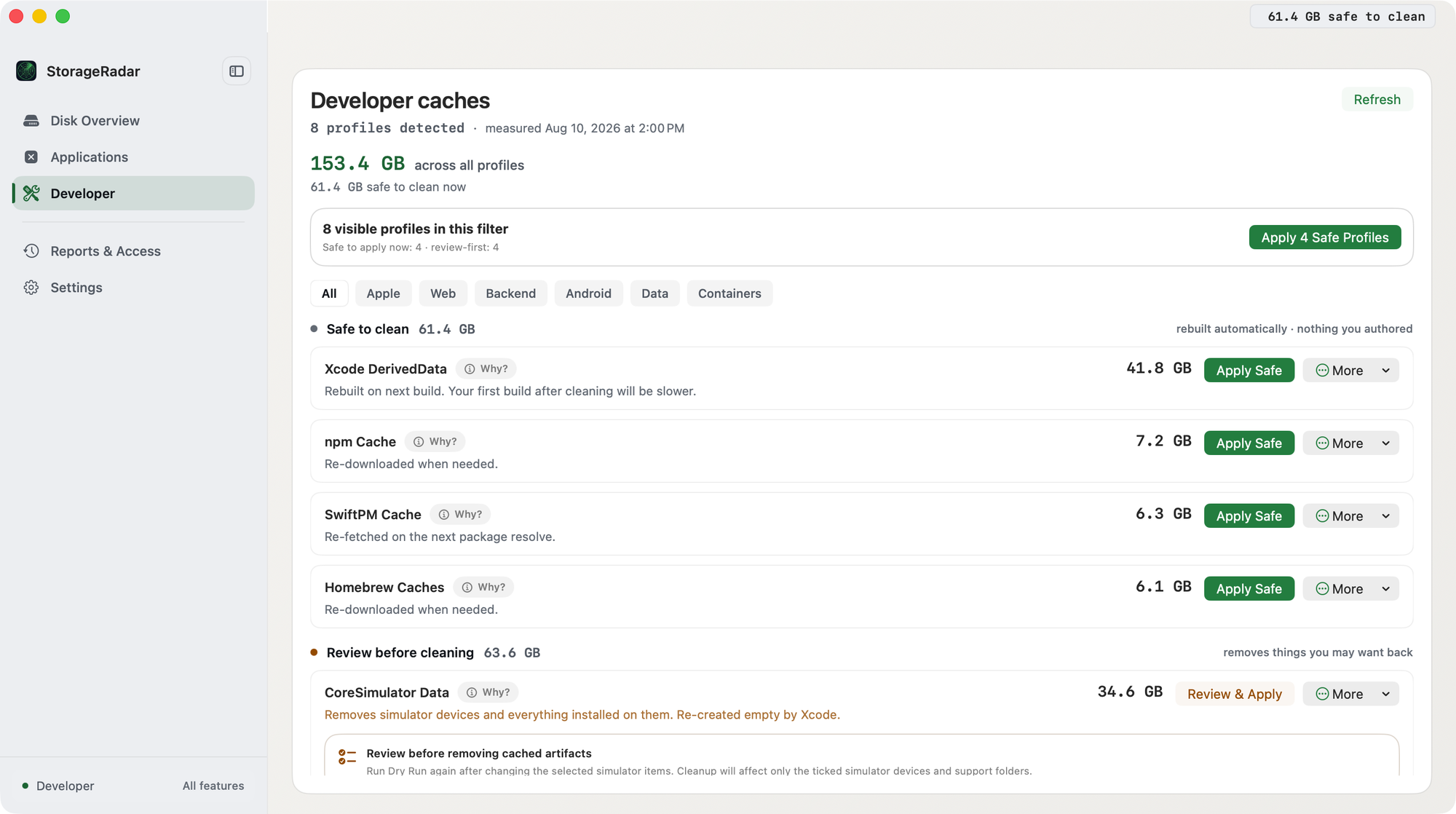
CoreSimulator Data sits under Review before cleaning, apart from DerivedData, which the next build recreates. Screenshot from an earlier scan, so the sizes differ from this article.How I measured
I measured on 26 October 2026 on a Mac mini with M4, macOS 27.0.1 and Xcode 27.1. All commands only read data:
xcrun simctl list devices --json
du -sk ~/Library/Developer/CoreSimulator/Devices/<UDID>/data
du -k -d 4 ~/Library/Developer/CoreSimulator/Devices/<UDID>/data | sort -rn | head -20
find ~/Library/Developer/CoreSimulator/Devices/<UDID>/data/Library/Application\ Support/PRBPosterExtensionDataStore -name '*.atx' | wc -l
Sizes come from du, divided by 1024 twice, the same binary units that du -h prints. The folders in each row don’t overlap, except that Containers includes its subfolders. Booted simulators keep writing, so their numbers move by the hour.
Bottom line
A big simulator usually holds iOS data, not your app. On my Mac, app containers took 0.07 to 0.34 GB per device, while poster snapshots, logs, downloaded assets and symbol caches took up to 9.5 GB. Measure the data folder, keep the devices whose state you need, and erase or delete the rest with simctl.
Frequently asked questions
Why is my iOS simulator so big when my app is small?
Your app is a small part of it. On my QA simulator the app containers took 0.34 GB out of 9.8 GB. The rest was iOS itself: a cache of Lock Screen poster snapshots, the system log, downloaded Siri and language assets, and a symbol cache.
What is PRBPosterExtensionDataStore in the iOS Simulator?
A folder inside each simulator's data folder that belongs to PosterBoard, the iOS component behind Lock Screen posters. The name is a string in the private PosterBoard.framework of the iOS 27.0 runtime. On my Mac it held 2.9 GB on one simulator, almost all of it .atx snapshot files.
Can I delete folders inside a simulator's data folder by hand?
I don't. Apple doesn't document these folders, so nobody can tell you what breaks. Use xcrun simctl erase to wipe a simulator's contents and settings, or xcrun simctl delete to remove the device.
Does erasing a simulator remove its iOS runtime?
No. Erase wipes the device's data folder and keeps the device and its runtime. Runtimes are separate disk images that you remove with xcrun simctl runtime delete.
Which folder belongs to which simulator?
Folders in ~/Library/Developer/CoreSimulator/Devices are named by UDID. Run xcrun simctl list devices to map each UDID to a device name, runtime and state.